Overview
AI model API costs scale directly with usage — and autonomous agents can consume tokens at rates that surprise finance teams. FinOps closes the loop between agent activity and cost management by making spend visible, attributable, and controllable in real time.
Unlike post-hoc billing analysis, Procurator's Gateway enforces budgets proactively: before a model API call is made, the Gateway checks the current spend against the applicable budget. If the call would exceed the limit, it is blocked and the agent receives a budget-exceeded error — no surprise invoice at the end of the month.
FinOps accuracy depends on model cost rates configured in the Models registry. Without rates, Procurator tracks token counts but cannot calculate costs. Set input/output rates per model for full FinOps capability.
Control Panel
The screenshot below shows the live Procurator administration interface for this feature.
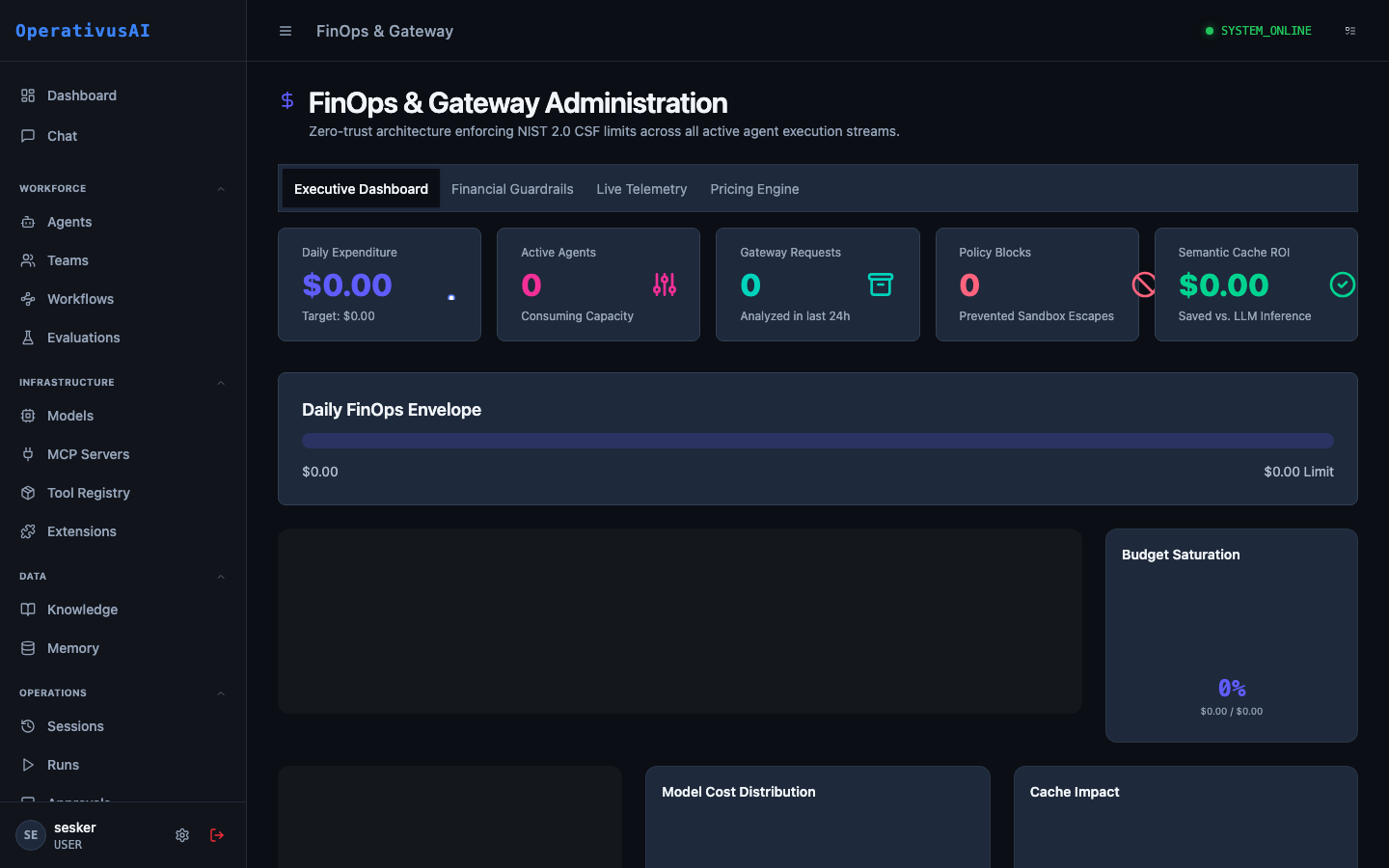
FinOps & Gateway — real-time cost tracking, budget enforcement, and spend attribution.
Architecture
Key Capabilities
Real-Time Cost Tracking
Costs are calculated and attributed within milliseconds of every model call completion — no batch processing lag.
Pre-Call Budget Enforcement
The Gateway blocks model calls that would exceed budget limits before they reach the provider — not after. Prevent runaway spend entirely.
Multi-Level Attribution
Every token is attributed to an agent, a team, and a model simultaneously. Slice cost data any way you need.
Burn Rate Analytics
View hourly, daily, and weekly burn rates per agent and team. Project forward to estimate month-end spend against budgets.
Budget Alerts
Receive alerts at configurable saturation thresholds (50%, 75%, 90%, 100%) before agents are blocked — time to take action.
Budget Reset Cycles
Configure budgets to reset daily, weekly, monthly, or on a custom interval — aligned to your billing cycles or sprint cadence.
Administration
FinOps Dashboard
Navigate to Administration → FinOps & Gateway. The dashboard provides an organization-wide financial overview:
- Total Spend: Organization-wide spend for the current period, with trend vs. prior period.
- Top Spenders: Ranked table of agents and teams by spend — identify cost leaders at a glance.
- Budget Saturation: Progress bars for all active budgets, color-coded by saturation level.
- Model Breakdown: Spend split by model provider and model ID — see what percentage of spend goes to each model.
- Hourly Burn Chart: Time-series chart of token consumption and cost over the current period, with anomaly highlights.
- Blocked Calls: Count of gateway-blocked calls in the current period — a budget that's blocking agents is worth revisiting.
Budget Configuration
Budgets can be applied at three levels. A single model call is checked against all applicable budgets simultaneously — a call is blocked if any applicable budget would be exceeded.
| Budget Level | Scope | Use Case |
|---|---|---|
| Agent Budget | Applies to all sessions for a specific agent | Limit individual agent spend — useful for agents with variable load or in testing |
| Team Budget | Applies to all sessions for agents belonging to a team | Departmental or project budget allocation — shared limit across a group of agents |
| Organization Budget | Applies to all sessions across the entire org | Hard monthly cap — ensures total org spend never exceeds a threshold |
Budget Configuration Reference
| Field | Type | Required | Description |
|---|---|---|---|
| name | string | required | Human-readable budget name (e.g., "Engineering Team — April"). |
| budgetType | enum | required | AGENT, TEAM, or ORGANIZATION. |
| targetId | string | optional | agentId or teamId (omit for ORGANIZATION type). |
| limitUsd | decimal | required | Maximum spend in USD for the budget period. |
| limitTokens | integer | optional | Maximum total tokens (input + output) for the budget period. Use as an alternative or complement to USD limits. |
| resetCycle | enum | required | DAILY, WEEKLY, MONTHLY, NEVER, or CUSTOM. |
| resetDay | integer | optional | For MONTHLY: day of month to reset (1-28). For WEEKLY: day of week (0=Sunday). For CUSTOM: not applicable. |
| alertThresholds | array | optional | Array of saturation percentages to alert on (e.g., [50, 75, 90]). |
| alertWebhookUrl | string | optional | URL to POST budget alert payloads to. |
| enforcementAction | enum | optional | BLOCK (default) or ALERT_ONLY. ALERT_ONLY raises alerts but does not block calls. |
Enforcement Actions
When a model call is blocked by the Gateway, the following happens:
- The call is not forwarded to the model provider — no tokens are consumed and no cost is incurred.
- The agent receives a structured error:
{"error": "BUDGET_EXCEEDED", "budgetId": "...", "currentSpendUsd": 45.23, "limitUsd": 45.00}. - The session is marked
BUDGET_EXCEEDEDin the Sessions ledger. - An alert is triggered regardless of configured thresholds (100% saturation).
- A budget block event is logged to the Security audit trail.
Cost Attribution Deep Dive
Every token in Procurator carries attribution metadata through the full stack:
- Session-level: Each session record carries a
totalTokensandtotalCostUsdfield, updated in real time as turns complete. - Turn-level: Each conversation turn records the model used, input tokens, output tokens, and turn cost. This enables granular analysis of which turns in a multi-turn session are expensive.
- Agent-level: The agent detail page in the Admin Dashboard shows cumulative token and cost totals for the current budget period.
- Team-level: The Team detail page aggregates costs across all agents in the team.
Budget Alerts
Configure alerts per budget to receive proactive warnings before enforcement kicks in:
Alert payloads are sent to the configured webhook URL, Slack channel, or email group associated with the budget.
The Gateway
The Gateway is Procurator's AI model API proxy layer. All model calls made by agents route through the Gateway, which provides:
- Budget enforcement: Pre-call budget checks as described above.
- Rate limiting: Per-agent and per-team requests-per-minute (RPM) and tokens-per-minute (TPM) limits to prevent provider-side rate limit errors from taking down an entire deployment.
- Request logging: Every model API request and response is logged with timing data for observability.
- Credential abstraction: Agents never hold provider API keys. The Gateway injects credentials at call time from the Models registry's secret store.
- Retry and fallback: Configurable retry logic for transient provider errors, with optional fallback to a secondary model if the primary is unavailable.
Because all model calls route through the Gateway, adding a new capability (budget enforcement, logging, rate limiting, model fallback) applies universally to all agents without any agent reconfiguration. The Gateway is where organizational policy lives at the infrastructure level.
Permissions
- finops:read— View FinOps dashboard, spend data, and budget status
- finops:create— Create new budgets
- finops:modify— Edit budget limits, thresholds, and enforcement actions
- finops:delete— Remove budgets
- gateway:configure— Configure Gateway rate limits, retry policies, and fallback models