Overview
The Network Mesh page is the A2A (Agent-to-Agent) control center in Procurator. It gives you two views in one place:
- Remote Peers — external A2A agents from other organizations or deployments that you've explicitly trusted and registered. Procurator can invoke these agents using the A2A protocol over authenticated HTTPS.
- Local Agent Cards — your own Procurator agents' A2A capability cards, showing what each agent advertises to the network: its model, type classification, and published capabilities that remote peers can discover and call.
Procurator implements the Google A2A Protocol — a standardized JSON-over-HTTP specification for inter-agent discovery and task submission. Any A2A-compliant agent from any platform can be registered as a remote peer and invoked by your local agents.
MCP (Model Context Protocol) connects agents to tools and data sources — file systems, APIs, databases. A2A connects agents to other agents — delegating entire tasks to a peer with its own model, capabilities, and execution context. Both are first-class integration layers in Procurator.
Network Mesh Page
Navigate to Intelligence → Network Mesh to open the A2A control center. The page is divided into two collapsible sections: Remote Peers and Local Agent Cards.
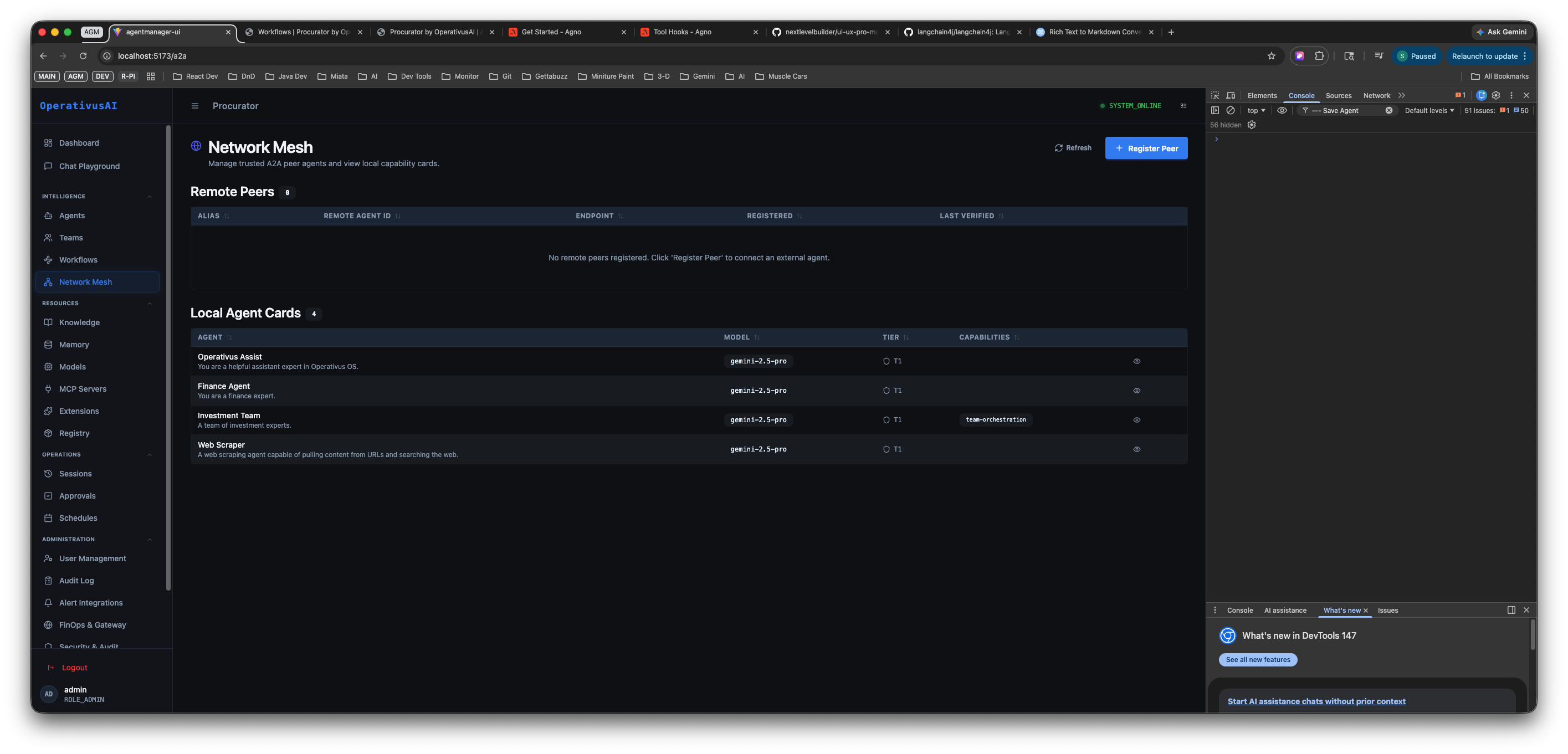
Network Mesh — Remote Peers table (top, empty) and Local Agent Cards (bottom, showing 4 local agents with their model, type, and capability badges).
Remote Peers
The Remote Peers table lists every external A2A agent you have trusted and registered with this Procurator deployment. Each row represents one peer connection your local agents can invoke.
| Column | Description |
|---|---|
| ALIAS | A human-readable name you assigned to this peer at registration time. Used in logs and agent routing references. |
| REMOTE AGENT ID | The peer's canonical agent identifier — the agentId from their A2A agent card. Globally unique across deployments. |
| ENDPOINT | The HTTPS base URL of the remote peer's A2A server. Procurator sends task requests and capability queries to this endpoint. |
| REGISTERED | Timestamp when this peer was first registered in your Network Mesh. |
| LAST VERIFIED | Most recent time Procurator successfully fetched the peer's agent card and confirmed the connection is reachable. |
When no remote peers have been registered, the table shows an empty state: "No remote peers registered. Click 'Register Peer' to connect an external agent."
Page Actions
- Refresh — Re-fetches all remote peer agent cards and updates Last Verified timestamps. Use this to check whether a peer that was unreachable has come back online.
- Register Peer — Opens the Register Remote Peer modal to add a new trusted external A2A agent. See the Registering a Remote Peer section below.
Local Agent Cards
The Local Agent Cards section shows every agent registered in your Procurator deployment that publishes an A2A capability card. This is the view external peers see when they query your mesh — it is your outbound A2A advertisement.
| Column | Description |
|---|---|
| AGENT | Agent display name and short description as configured in the agent's General tab. |
| MODEL | The primary model backing this agent (e.g., gpt-4o-0.3-pre). Published in the agent card so peers know what capability level to expect. |
| TYPE | The agent's classification type — distinguishes individual agents from team orchestrators and specialized roles. |
| CAPABILITIES | Capability badges published by this agent: tool integrations, orchestration modes (e.g., base-orchestration), and any custom skill tags defined on the agent. |
The section header shows a count of how many local agents are publishing cards (e.g., "Local Agent Cards ▶ 4"). Click the header to collapse or expand the section.
Only agents with A2A card publishing enabled appear in the Local Agent Cards list. To add or remove an agent from the mesh, edit the agent in Intelligence → Agents and toggle the A2A publishing setting in the Security tab.
Registering a Remote Peer
Click Register Peer to open the registration modal. This connects a trusted external A2A agent to your Network Mesh so your local agents can invoke it.
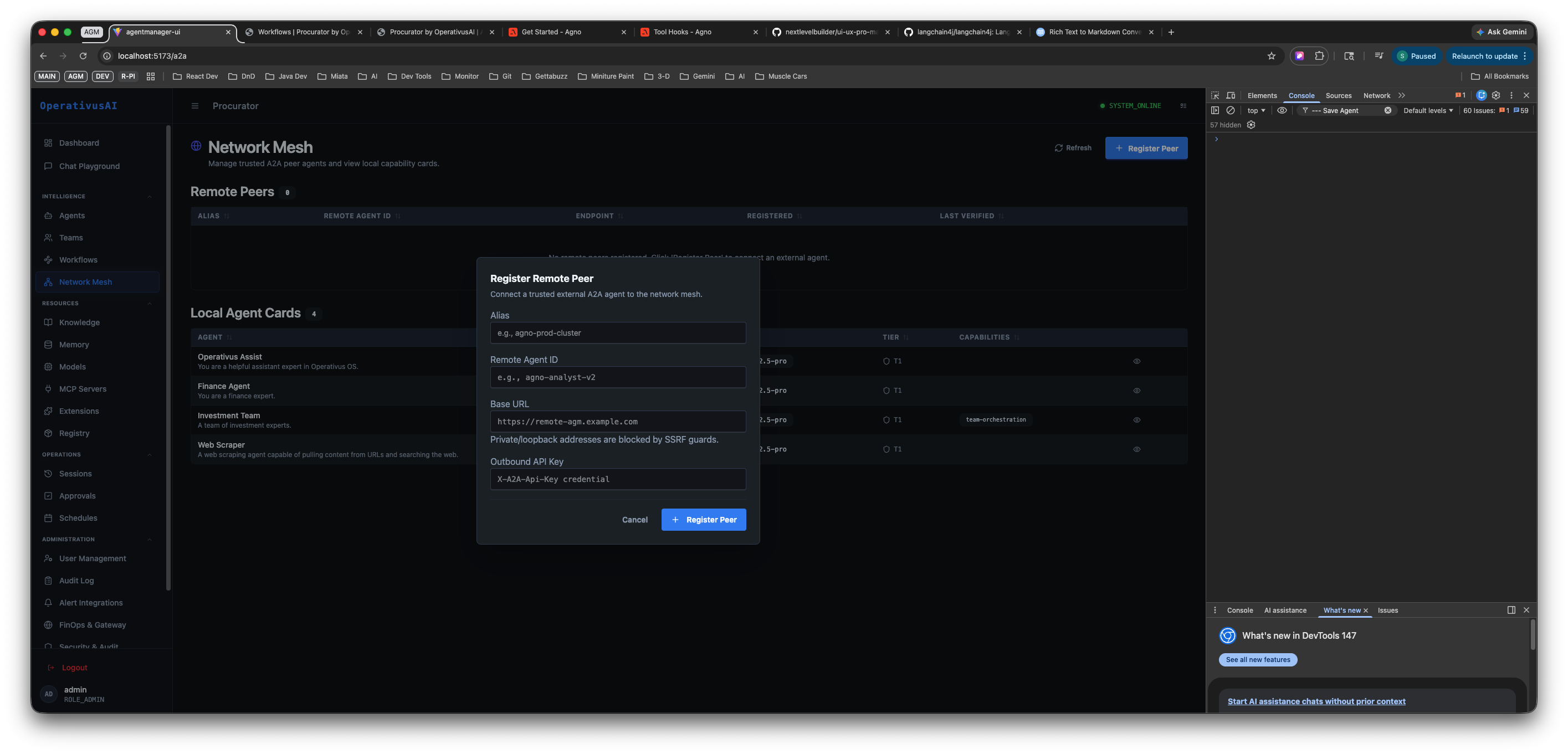
Register Remote Peer modal — provide the peer's alias, agent ID, base URL, and outbound API key. Private and localhost URLs are blocked by SSRF guards.
Registration Fields
| Field | Required | Description |
|---|---|---|
| Alias | required | A short human-readable name for this peer connection. Appears in the Remote Peers table and in execution logs when this peer is invoked. Example: npm-prod-cluster, partner-risk-agent. |
| Remote Agent ID | required | The peer's canonical A2A agent identifier. This is the agentId from the remote agent's published agent card. Example: agt-8b4j1p41-r2. |
| Base URL | required | The HTTPS root URL of the remote peer's A2A server. Procurator will append standard A2A paths (e.g., /.well-known/agent.json, /tasks/send) to this base. Example: https://remote.agt.example.com. Private/localhost addresses are blocked by SSRF guards. |
| Outbound API Key | required | The API credential Procurator presents when calling the remote peer. This key is sent as a Bearer token on outbound A2A requests. Obtain this key from the operator of the remote peer. Stored encrypted at rest. |
How to Register a Peer — Step by Step
-
1Obtain peer credentials from the remote operator
Before registering, you need the peer's Agent ID, Base URL, and an Outbound API Key issued by the remote deployment. Coordinate with the team running the external A2A agent to receive these values securely.
-
2Click Register Peer
From the Network Mesh page, click the Register Peer button (top right). The registration modal opens.
-
3Enter the Alias
Choose a short, descriptive name for this connection — something your team will recognize in logs and routing references. For example:
partner-compliance-agentorfinops-risk-api. -
4Enter the Remote Agent ID
Paste the canonical agent identifier provided by the remote operator. This is the unique ID from the remote agent's A2A card (format:
agt-XXXXXXXX-XX). -
5Enter the Base URL
Paste the HTTPS root URL of the remote A2A server. Procurator will validate this URL against SSRF guards — private IP ranges (
10.x,192.168.x,172.16–31.x) and localhost are rejected. Only publicly routable HTTPS endpoints are accepted. -
6Enter the Outbound API Key
Paste the API key issued by the remote peer operator. Procurator will send this as a Bearer token on all outbound requests to this peer. The key is encrypted before storage and is never returned in plaintext after saving.
-
7Click Register Peer
Procurator immediately attempts to fetch the remote agent's card at
{baseUrl}/.well-known/agent.json. If the fetch succeeds, the peer appears in the Remote Peers table with a LAST VERIFIED timestamp. If it fails, an error is shown — check the Base URL and API Key.
Procurator blocks registration of any peer whose Base URL resolves to a private or localhost address. This prevents Server-Side Request Forgery attacks where a malicious peer registration could be used to probe internal network resources. Only publicly routable HTTPS endpoints are permitted.
A2A Protocol
The A2A specification defines how agents discover, authenticate, and exchange tasks across organizational boundaries. Procurator implements A2A as a native first-class layer — every registered agent can publish a card and every registered remote peer can receive tasks via the standard API.
Agent Cards
Every A2A-enabled agent in Procurator publishes an Agent Card — a JSON descriptor at a well-known URL. External peers and other Procurator deployments fetch this card to understand the agent's capabilities, endpoint, and authentication requirements before invoking it.
GET /a2a/{agentId}/.well-known/agent.json

{
  "name": "Finance Agent",
  "description": "Performs quantitative analysis on financial datasets",
  "url": "https://procurator.example.com/a2a/agents/fin-001",
  "version": "1.0.0",
  "capabilities": {
    "streaming": true,
    "pushNotifications": false
  },
  "skills": [
    { "id": "analyze-financials", "name": "Analyze Financial Data" },
    { "id": "generate-report",    "name": "Generate Financial Report" }
  ]
}
Task Submission
Once a peer is registered, your local agents can submit tasks to it using the standard A2A tasks/send endpoint. Procurator handles authentication and routing automatically:
POST /a2a/{remoteAgentId}/tasks/send
Authorization: Bearer <outbound-api-key>
Content-Type: application/json

{
  "id": "task-uuid",
  "message": {
    "role": "user",
    "parts": [{ "text": "Analyze Q3 2026 revenue data and identify anomalies" }]
  }
}
Capability Discovery
When a remote peer is registered, Procurator fetches its agent card and indexes the peer's published skills array. This index is used by Teams and Workflows operating in autonomous routing modes to determine which registered peer is best suited for a given sub-task.
Key Capabilities
Remote Peer Registry
Maintain a trusted registry of external A2A agents. Each registered peer is verified on registration and periodically re-checked to confirm continued reachability.
Local Capability Cards
View the A2A capability cards your agents publish to the network — including their model, type classification, and skill advertisements that external peers discover.
Cross-boundary Agent Calls
Invoke A2A-compatible agents from any platform — other Procurator deployments, external partners, or third-party services — as first-class steps in Teams and Workflows.
SSRF Guard
All peer Base URLs are validated against SSRF protection rules. Private IP ranges and localhost addresses are rejected at registration time — no exceptions.
Outbound API Key Auth
Each remote peer is associated with a dedicated outbound API key that Procurator presents on every request. Keys are encrypted at rest and never returned in plaintext.
Periodic Verification
Procurator automatically re-fetches peer agent cards and updates Last Verified timestamps. Use the Refresh button to trigger an immediate re-check across all registered peers.
Security
When your agents invoke a remote peer, that peer executes under its own platform's governance model. Procurator cannot apply budget controls, RLAC policies, or PII redaction to outputs generated by external agents. Apply scrutiny to what data you send to remote peers and how you use their responses downstream.
- SSRF protection — Private IP ranges and localhost addresses are blocked at peer registration. Only publicly routable HTTPS Base URLs are accepted.
- Outbound authentication — Procurator presents the registered API key as a Bearer token on all outbound A2A requests. Each peer has its own isolated key.
- Inbound authentication — All inbound A2A requests to your local agents are authenticated before reaching the target agent. Unauthorized calls are rejected and logged.
- Audit logging — All A2A task submissions — both inbound and outbound — are logged to the Security audit trail with agent IDs, timestamps, and payload metadata.
- Rate limiting — Outbound calls to each remote peer are rate-limited to prevent runaway agents from flooding external services.
- Card visibility control — Local agent cards can be set to private (internal discovery only) or public (externally discoverable). Configure this per-agent in the Security tab.
Permissions
- network:read— View the Remote Peers table and Local Agent Cards list
- network:register— Register new remote peers via the Register Peer modal
- network:delete— Remove a registered remote peer from the mesh
- network:refresh— Trigger a manual re-verification of all registered peers
- agents:configure— Required to toggle A2A card publishing on individual local agents
Best Practices
- Use descriptive aliases. The Alias field is what appears in execution logs and routing references. Choose a name that clearly identifies the owning team and function — e.g.,
partner-compliance-agent, notexternal-1. - Rotate outbound API keys on a schedule. Treat remote peer API keys like infrastructure secrets. Rotate them at least quarterly and immediately after any personnel change on either side of the connection.
- Verify peers before relying on them in production Workflows. After registration, use the Refresh button to confirm the peer is reachable and its agent card is current. Only route production Workflow steps through peers with a recent Last Verified timestamp.
- Limit the capabilities you advertise in local agent cards. Publish only the skills that you intend external peers to invoke. Overly broad capability advertisements increase your attack surface for unsolicited inbound A2A calls.
- Treat remote peer outputs as untrusted input. Pass remote peer responses through a local Validator agent step before using them in downstream decisions — especially if the peer is operated by a third party.
- Monitor Last Verified timestamps. A peer that has not been verified recently may have changed its endpoint, revoked its card, or gone offline. Stale peers should be re-verified or removed rather than silently failing at runtime.